Balance
How to check your Stripe available balance on your Mac
View your available Stripe balance in the Mac menu bar and understand how it relates to pending funds and payouts.
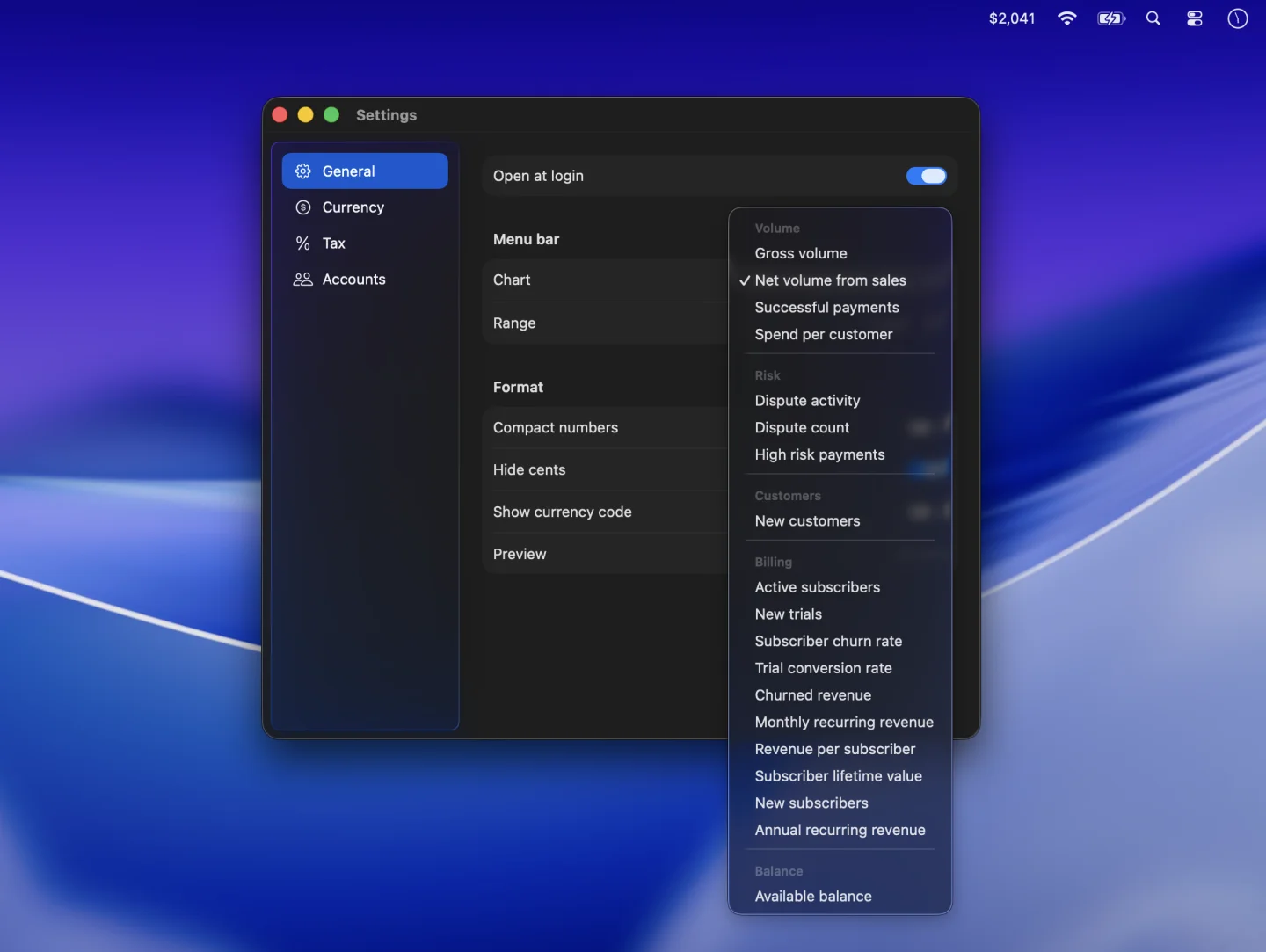
Show your available balance
- Connect PayBar with a restricted Stripe key that has read access to Balance.
- Click PayBar in the menu bar and open Settings → General.
- Open Chart and choose Available balance under Balance.
PayBar shows the available balance from its most recent refresh. The date range applies to activity such as sales, so changing it has no effect on this snapshot.
Understand available funds, pending funds, and payouts
Available funds have settled in your Stripe balance and are eligible for payout. Pending funds are still settling. A payout moves funds from Stripe to your bank account. Use the Stripe Dashboard to see pending funds, payout status, or expected arrival dates. See Stripe’s guide to balances and settlement.
Compare what PayBar and Stripe show
Check that you’re viewing the same Stripe account and currency in both places. In PayBar, Show currency code identifies the displayed currency. For a direct comparison, turn off Convert amounts in Currency and Set aside tax in Tax, if either is on. If the balance is missing, check that your restricted key has read access to Balance and that you connected the intended live or test account.
PayBar on your Mac
A 24-hour free trial will be available when online checkout opens.
Launch details