Recurring revenue
How to track Stripe subscriber churn on your Mac
See what subscriber churn, churned revenue, trial conversion rate and lifetime value mean in PayBar’s Stripe menu bar.
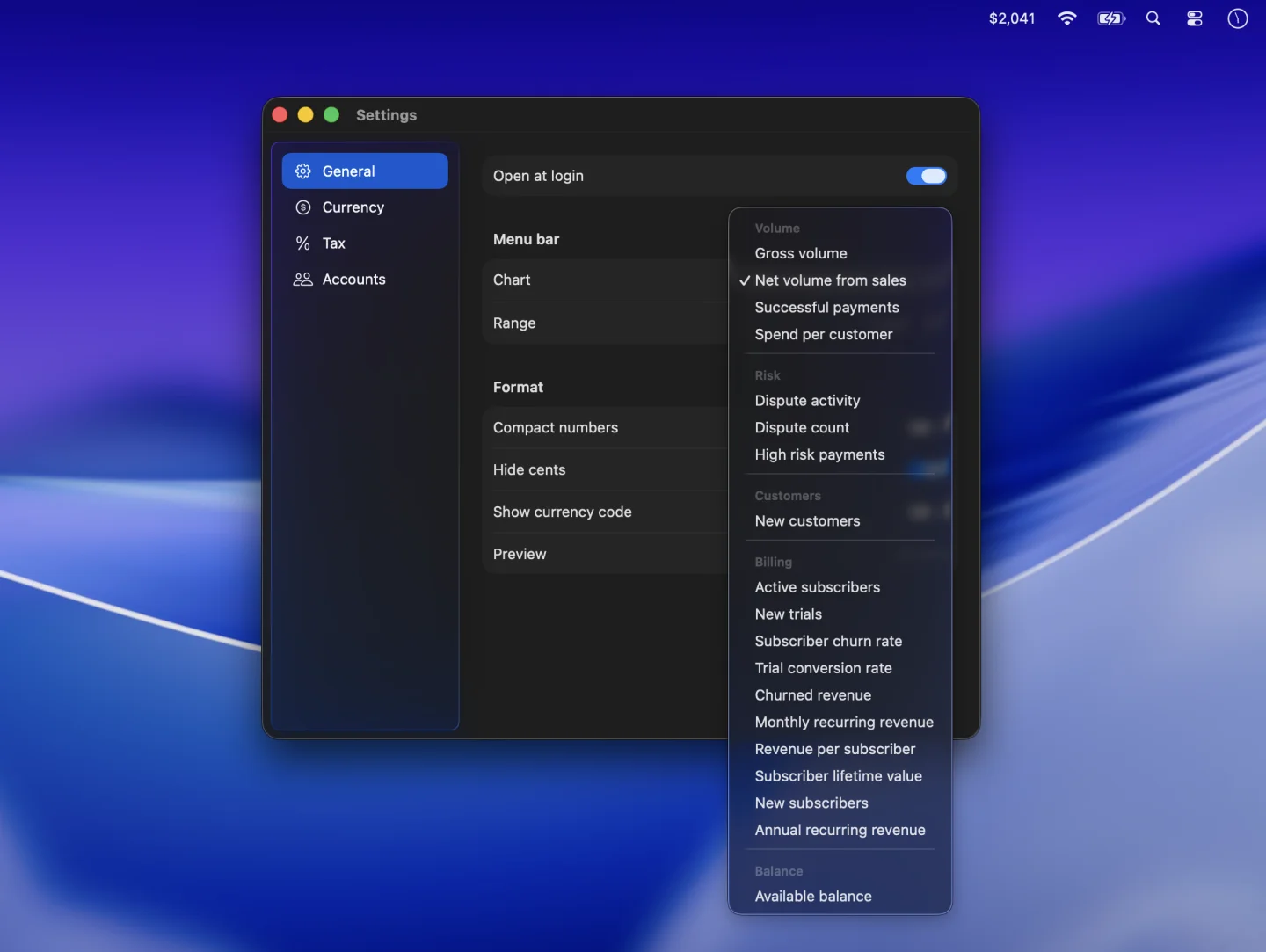
Churn tracks customers or recurring revenue lost over time. PayBar provides a set of subscription-based estimates so you can keep an eye on your Stripe subscription activity from your Mac menu bar. These figures are useful signals, but they should not be treated as a substitute for Stripe Billing’s detailed historical analytics.
Pin a churn metric to your Mac menu bar
- Check that your Stripe restricted key has read access to subscriptions. See the API key permissions guide.
- Click the PayBar menu bar amount and open Settings → General.
- Open the Chart picker and select Subscriber churn rate or Churned revenue under Billing.
What subscriber churn rate means in PayBar
PayBar calculates a snapshot ratio using subscription records from Stripe. The numerator is the count of canceled subscriptions or those that have a recorded cancellation date. The denominator is that count plus the number of active or trialing subscriptions. For example, if you have 90 active records and 10 canceled records, PayBar's estimate is 10 ÷ 100 = 10%.
This is not monthly customer churn. The app does not reconstruct your historical subscriber base for a selected month, and records can overlap when a subscription is still active but has a cancellation date. A customer with multiple subscriptions can also appear more than once. Changing the date range does not affect this snapshot.
How to read churned revenue
Select Churned revenue to see the monthly equivalent of eligible recurring list prices on subscription records with a cancellation date in your chosen period. A canceled $120 annual subscription contributes $10 to this estimate. Discounts, usage, plan changes and billing adjustments can make the number differ from Stripe’s historical MRR churn.
Check trial conversion and subscriber value
PayBar’s Trial conversion rate is the share of subscription records with a trial start that are currently active. It does not build a historical trial cohort. Subscriber lifetime value uses estimated monthly recurring revenue per active subscription divided by the app’s snapshot churn ratio. When there is no active base or positive churn ratio, the estimate shows zero rather than an infinite customer value.
Real-world lifetime value can vary with costs, contraction and changing customer behavior. For deeper recurring revenue analysis, see Stripe Billing’s own analytics and data exports.
Read churn alongside recurring revenue
Switch to Monthly recurring revenue or Annual recurring revenue to view the current subscription estimate. Select New subscribers or New trials to monitor new records during a chosen date range. See our guide to tracking Stripe MRR and ARR and how to compare PayBar’s MRR estimate with the Stripe Dashboard.
PayBar on your Mac
A 24-hour free trial will be available when online checkout opens.
Launch details